
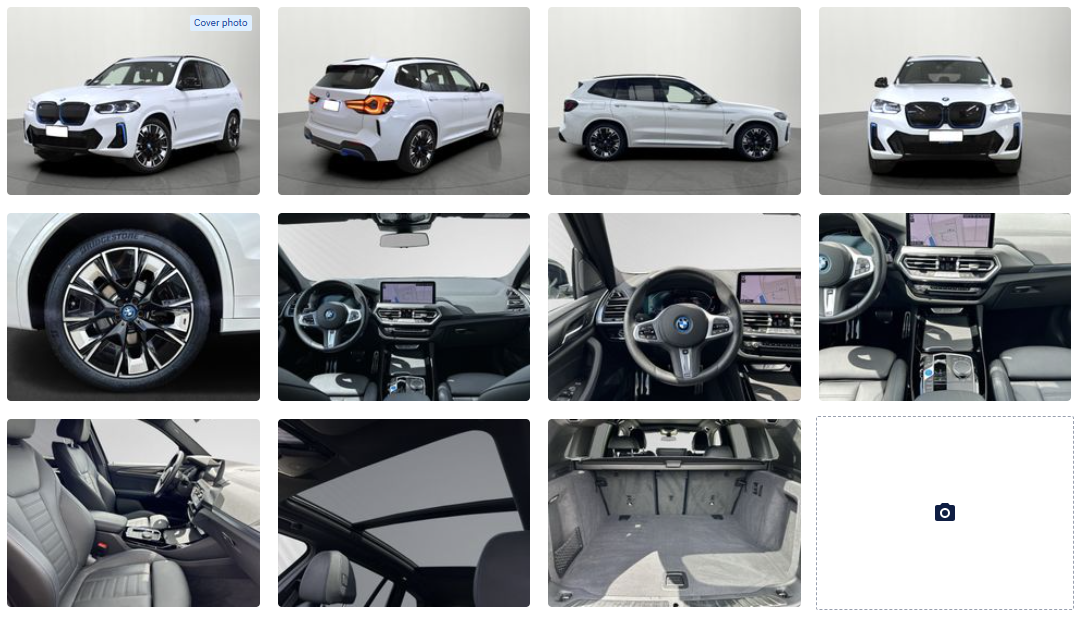
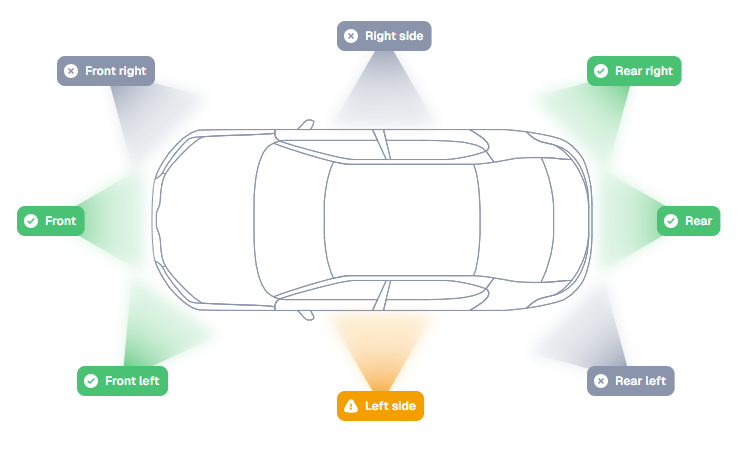
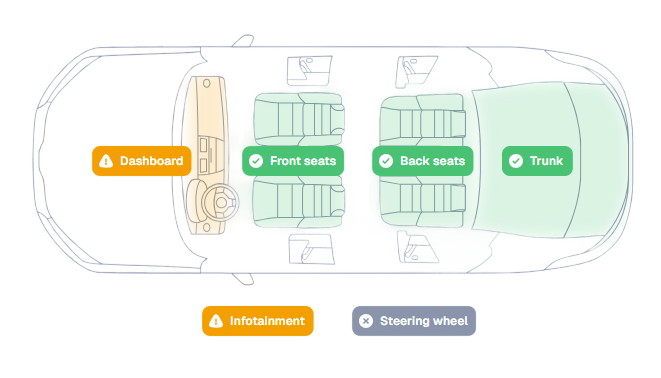
Vehicle data
Get the vehicle ready
Buy with a clearer view of VIN equipment, condition, history and market prices. Inspect on or offline; keep purchase and brokerage documents distinct and link trade-ins to sales.
Used Car Sales
Give every used-car sale a clear next step from preparation to payment. Keep vehicle data, customer conversations and deal finances connected across one site or a dealer group.
Vehicle photos · Omnetic AI · New interest · BMW iX3
Acquisition routes
Choose the route that fits each deal: buy into stock, sell on a customer's behalf or check potential resale interest through dealer offers before agreeing to buy. Inspect the car with CarAudit on your phone before committing.

Prepare & publish
Turn vehicle facts and photos into listings buyers can trust. Work from one vehicle record, publish with Magic and keep every channel current.
Buy with a clearer view of VIN equipment, condition, history and market prices. Inspect on or offline; keep purchase and brokerage documents distinct and link trade-ins to sales.
Present stock clearly. Guide photos; keep purchase, sale and service albums, check with PhotoChecker, and prepare dealer plates, backgrounds and a 360° view.
Take prepared stock live in one click. Set programme and watermark; Magic clears photo backgrounds, saves originals in a new album, writes copy and sends the review link.
Know where each car is and what it costs the business. Keep receiving, dispatch, repairs and transfers tied to its branch, warehouse, parking place and keys, with expected and actual costs on the record.
Keep each advert relevant to its audience and current as vehicle details change. Refine Magic's copy with facts and benefits, set portal prompts, languages and currencies, and reuse the vehicle record on your website and showroom screen.
Put relevant stock in front of specific buyer segments. Apply campaign prices and watermarks, then automatically republish matching adverts when those terms change so buyers see the current offer.
Capture & assign
Capture enquiries from every channel, give each one a clear owner and respond while the customer is interested. The team can see who needs to act next, with missed responses escalated.




Give salespeople a complete lead without retyping. Capture enquiries from portals, web forms, Facebook, Instagram or any other source; find or create the customer, match the vehicle and keep the message, channel and campaign together.
Keep every enquiry moving towards a reply. Route it to the right team, share it fairly among salespeople and notify its owner. Track response time and escalate inactivity so a colleague can take over.
Keep buyers engaged with an immediate, personalised first reply sent automatically. The salesperson sees the message, customer history and suggested next best action, with later replies connected through Outlook and WhatsApp.
Move deals forward
Give salespeople the context to act at the right moment. Keep each opportunity's stage, last contact, customer history and conversation together, while the team can see what needs follow-up.
Giulia Rossi
10 Jul 2026 · 3 months agoGiulia Keller
14 Jul 2024 · 2 years agoLukas Keller
15 Jul 2024 · 2 years agoOmnetic Demo Zürich
15 Jul 2024 · 2 years agoGiulia Rossi
16 Jul 2026Lea Meier
25 Sept 2026Giulia Keller
20 Jul 2026Giulia Rossi
27 Sept 2026Marc Favre
24 Sept 2026Lea Keller
22 Sept 2026Respond with customer context in view. From Kanban, see last contact, active interests, buying or selling cases, past sales, purchases and lost opportunities.
Keep messages with the right customer or deal. Manage mailing, match synced Outlook emails to opportunities automatically, and retain WhatsApp and chat in the history.
Focus on customers needing a personal reply. See the automatic first response and waiting follow-ups; choose the next step and prepare a reply or task with the record in view.
Keep entitlements, templates, summaries and sales arguments with the customer. Ask the AI assistant in plain language to open a page, filter a view or report a problem. Filter opportunities by source, stage and salesperson, at the desk or on the move.
Offer & close
Give salespeople a current, shareable offer for each customer. Photos, condition and terms stay together, with a direct conversation and a clear validity window before the next decision.
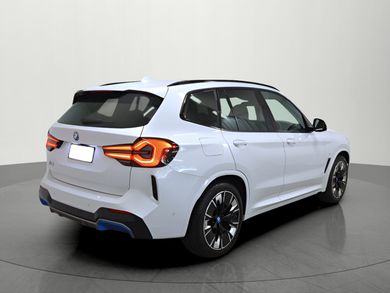
 Commercial offer for Lea MeierBMW iX3 210 kW Inspiring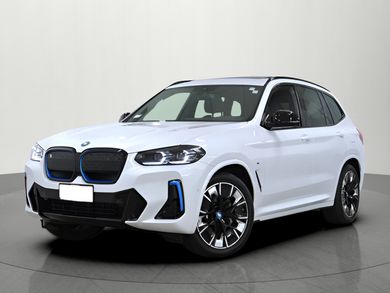

 Year of manufacture2020
 Mileage81,000 km
 BodySUV / Off-road
 DriveRWD
 TransmissionAutomatic
 Fuel typeElectric
 Power210 kW / 286 HP
 CO₂ emissions0 g / km
 Battery capacity74 kWh / 204 AhBattery warranty160,000 km / 17 Jul 2026
 Electric-only range460 km
'%3e%3cpath%20id='charger'%20d='M11.23%2020.8L16.73%2010.075H12.88V3.2L7.38%2013.925H11.23V20.8ZM12%2023C10.4783%2023%209.04833%2022.7113%207.71%2022.1338C6.37167%2021.5562%205.2075%2020.7725%204.2175%2019.7825C3.2275%2018.7925%202.44375%2017.6283%201.86625%2016.29C1.28875%2014.9517%201%2013.5217%201%2012C1%2010.4783%201.28875%209.04833%201.86625%207.71C2.44375%206.37167%203.2275%205.2075%204.2175%204.2175C5.2075%203.2275%206.37167%202.44375%207.71%201.86625C9.04833%201.28875%2010.4783%201%2012%201C13.5217%201%2014.9517%201.28875%2016.29%201.86625C17.6283%202.44375%2018.7925%203.2275%2019.7825%204.2175C20.7725%205.2075%2021.5562%206.37167%2022.1338%207.71C22.7113%209.04833%2023%2010.4783%2023%2012C23%2013.5217%2022.7113%2014.9517%2022.1338%2016.29C21.5562%2017.6283%2020.7725%2018.7925%2019.7825%2019.7825C18.7925%2020.7725%2017.6283%2021.5562%2016.29%2022.1338C14.9517%2022.7113%2013.5217%2023%2012%2023Z'%20fill='%2300A1FF'/%3e%3c/g%3e%3c/g%3e%3c/svg%3e) AC charging power11 kWDC charging power150 kW
AC charging power11 kWDC charging power150 kW AC charging time7 hrDC charging time34 min
 Battery voltage400 V
You can trust our detailed assessment, which confirms the battery is performing optimally and reliably.
Download certificate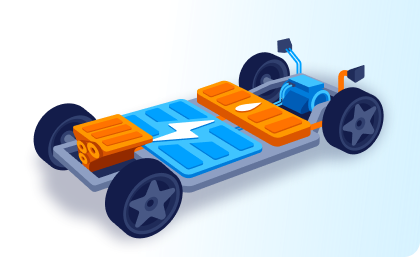
2021 BMW iX3 Inspiring, one previous owner, first registered in Germany, with a well-documented history and complete electronic service record. The iX3 pairs the familiar SUV format with BMW electric drivetrain technology in a package designed for everyday use.
The vehicle combines 150 kW DC fast charging and 11 kW AC charging with 510 litres of luggage space. Heated sport seats, Harman/Kardon audio, navigation, Apple CarPlay and Android Auto complete its documented assistance and comfort equipment.

'%3e%3cpath%20d='M4%2020C3.71667%2020%203.47917%2019.9042%203.2875%2019.7125C3.09583%2019.5209%203%2019.2834%203%2019V11L5.1%205.00003C5.2%204.70003%205.37917%204.45836%205.6375%204.27503C5.89583%204.0917%206.18333%204.00003%206.5%204.00003H11.3C11.2%204.3167%2011.125%204.6417%2011.075%204.97503C11.025%205.30836%2011%205.65003%2011%206.00003H6.85L5.8%209.00003H11.675C12.0417%209.80003%2012.5542%2010.4959%2013.2125%2011.0875C13.8708%2011.6792%2014.6%2012.1417%2015.4%2012.475C15.2667%2012.625%2015.1667%2012.7875%2015.1%2012.9625C15.0333%2013.1375%2015%2013.3167%2015%2013.5C15%2013.9167%2015.1458%2014.2709%2015.4375%2014.5625C15.7292%2014.8542%2016.0833%2015%2016.5%2015C16.9167%2015%2017.2708%2014.8542%2017.5625%2014.5625C17.8542%2014.2709%2018%2013.9167%2018%2013.5C18%2013.4167%2017.9958%2013.3334%2017.9875%2013.25C17.9792%2013.1667%2017.9583%2013.0834%2017.925%2013C18.4583%2013%2018.9833%2012.9459%2019.5%2012.8375C20.0167%2012.7292%2020.5167%2012.5584%2021%2012.325V19C21%2019.2834%2020.9042%2019.5209%2020.7125%2019.7125C20.5208%2019.9042%2020.2833%2020%2020%2020H19C18.7167%2020%2018.4792%2019.9042%2018.2875%2019.7125C18.0958%2019.5209%2018%2019.2834%2018%2019V18H6V19C6%2019.2834%205.90417%2019.5209%205.7125%2019.7125C5.52083%2019.9042%205.28333%2020%205%2020H4ZM7.5%2015C7.91667%2015%208.27083%2014.8542%208.5625%2014.5625C8.85417%2014.2709%209%2013.9167%209%2013.5C9%2013.0834%208.85417%2012.7292%208.5625%2012.4375C8.27083%2012.1459%207.91667%2012%207.5%2012C7.08333%2012%206.72917%2012.1459%206.4375%2012.4375C6.14583%2012.7292%206%2013.0834%206%2013.5C6%2013.9167%206.14583%2014.2709%206.4375%2014.5625C6.72917%2014.8542%207.08333%2015%207.5%2015ZM18%2011C16.6167%2011%2015.4375%2010.5125%2014.4625%209.53753C13.4875%208.56253%2013%207.38336%2013%206.00003C13%204.63336%2013.4833%203.45836%2014.45%202.47503C15.4167%201.4917%2016.6%201.00003%2018%201.00003C19.3833%201.00003%2020.5625%201.48753%2021.5375%202.46253C22.5125%203.43753%2023%204.6167%2023%206.00003C23%207.38336%2022.5125%208.56253%2021.5375%209.53753C20.5625%2010.5125%2019.3833%2011%2018%2011ZM18%209.00003C18.1333%209.00003%2018.25%208.95003%2018.35%208.85003C18.45%208.75003%2018.5%208.63336%2018.5%208.50003C18.5%208.3667%2018.45%208.25003%2018.35%208.15003C18.25%208.05003%2018.1333%208.00003%2018%208.00003C17.8667%208.00003%2017.75%208.05003%2017.65%208.15003C17.55%208.25003%2017.5%208.3667%2017.5%208.50003C17.5%208.63336%2017.55%208.75003%2017.65%208.85003C17.75%208.95003%2017.8667%209.00003%2018%209.00003ZM17.5%207.00003H18.5V3.00003H17.5V7.00003Z'%20fill='%233E47DD'/%3e%3c/g%3e%3c/svg%3e) Exterior
Exterior'%3e%3cpath%20fill-rule='evenodd'%20clip-rule='evenodd'%20d='M19.9515%202.57324C29.8392%202.57324%2037.868%2010.602%2037.868%2020.4906C37.868%2030.3791%2029.8392%2038.4071%2019.9515%2038.4071C10.063%2038.4071%202.03418%2030.3791%202.03418%2020.4906C2.03418%2010.602%2010.063%202.57324%2019.9515%202.57324ZM19.9515%2017.157C18.1114%2017.157%2016.618%2018.6505%2016.618%2020.4906C16.618%2022.3298%2018.1114%2023.8233%2019.9515%2023.8233C21.7907%2023.8233%2023.2842%2022.3298%2023.2842%2020.4906C23.2842%2018.6505%2021.7907%2017.157%2019.9515%2017.157ZM6.49576%2023.3329C7.64089%2028.7718%2012.0058%2033.0314%2017.4995%2034.0217V27.5C17.4909%2023.344%2012.4996%2023.3329%2012.4996%2023.3329H6.49576ZM33.5331%2018.3355C32.4975%2011.7686%2026.8069%206.74041%2019.9515%206.74041C13.0953%206.74041%207.40467%2011.7686%206.36909%2018.3355C7.99778%2018.3373%2010.627%2018.3398%2011.666%2018.333C13.3871%2018.3218%2015.5516%2016.3397%2016.618%2015.833C18.417%2014.978%2019.9994%2014.9994%2019.9994%2014.9994C19.9994%2014.9994%2021.5828%2014.978%2023.3818%2015.833C24.4473%2016.3397%2026.6118%2018.3218%2028.3329%2018.333C29.3522%2018.339%2031.8984%2018.3373%2033.5331%2018.3355ZM22.4994%2034.0037C27.9478%2032.9809%2032.2681%2028.7402%2033.4064%2023.3329H27.4993C27.4993%2023.3329%2022.508%2023.344%2022.4994%2027.5V34.0037Z'%20fill='%233E47DD'/%3e%3c/g%3e%3cdefs%3e%3cclipPath%20id='clip0_6217_12956'%3e%3crect%20width='40'%20height='40'%20fill='white'/%3e%3c/clipPath%3e%3c/defs%3e%3c/svg%3e) Interior
Interior'%3e%3cpath%20d='M11%2022V19H4V17H20V19H13V22H11ZM9%2011.5C9.28333%2011.5%209.52083%2011.4042%209.7125%2011.2125C9.90417%2011.0208%2010%2010.7833%2010%2010.5C10%2010.2167%209.90417%209.97917%209.7125%209.7875C9.52083%209.59583%209.28333%209.5%209%209.5C8.71667%209.5%208.47917%209.59583%208.2875%209.7875C8.09583%209.97917%208%2010.2167%208%2010.5C8%2010.7833%208.09583%2011.0208%208.2875%2011.2125C8.47917%2011.4042%208.71667%2011.5%209%2011.5ZM15%2011.5C15.2833%2011.5%2015.5208%2011.4042%2015.7125%2011.2125C15.9042%2011.0208%2016%2010.7833%2016%2010.5C16%2010.2167%2015.9042%209.97917%2015.7125%209.7875C15.5208%209.59583%2015.2833%209.5%2015%209.5C14.7167%209.5%2014.4792%209.59583%2014.2875%209.7875C14.0958%209.97917%2014%2010.2167%2014%2010.5C14%2010.7833%2014.0958%2011.0208%2014.2875%2011.2125C14.4792%2011.4042%2014.7167%2011.5%2015%2011.5ZM5%208.6L6.65%203.8C6.73333%203.56667%206.87083%203.375%207.0625%203.225C7.25417%203.075%207.46667%203%207.7%203H16.3C16.5333%203%2016.7458%203.075%2016.9375%203.225C17.1292%203.375%2017.2667%203.56667%2017.35%203.8L19%208.6V15.2C19%2015.4333%2018.925%2015.625%2018.775%2015.775C18.625%2015.925%2018.4333%2016%2018.2%2016H17.8C17.5667%2016%2017.375%2015.925%2017.225%2015.775C17.075%2015.625%2017%2015.4333%2017%2015.2V14H7V15.2C7%2015.4333%206.925%2015.625%206.775%2015.775C6.625%2015.925%206.43333%2016%206.2%2016H5.8C5.56667%2016%205.375%2015.925%205.225%2015.775C5.075%2015.625%205%2015.4333%205%2015.2V8.6ZM7.65%207H16.35L15.65%205H8.35L7.65%207Z'%20fill='%233E47DD'/%3e%3c/g%3e%3c/svg%3e) MechanicsNot assessed
MechanicsNot assessed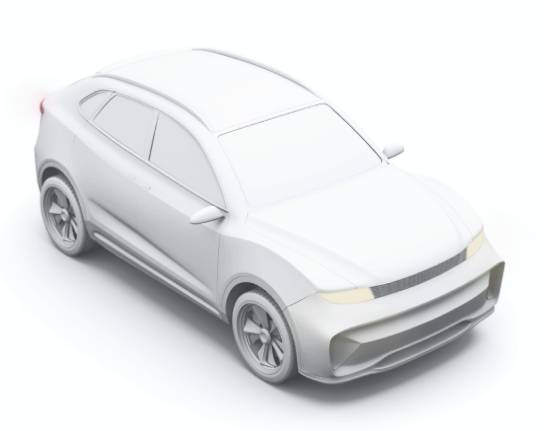
 Luggage compartment volume510 l
 Curb weight2,260 kgMaximum weight2,725 kgMaximum load capacity390 kg
Keep photos, equipment, price, terms and condition evidence current. For EVs, add battery status, certificate, warranty, range and charging.
Customers can share or download the offer as a PDF and ask the seller directly in the offer's chat. The conversation stays with the opportunity.
Show when the offer expires so the customer knows how long they have to decide. If the vehicle is reserved, show that separate deadline clearly.
Compare standard finance, balloon finance and operating lease on their own terms. Show the customer a clear monthly payment and the full cost before they choose.
Help customers compare standard finance terms with a clear view of the full cost. Set rates across terms and down payments, select a primary option, and show the monthly payment, effective annual rate and total payable. The proposal can also appear in customer documents.
Valuation Specialist
Price and margin
Compare the down payment, monthly payment, effective annual rate and total payable before selecting a primary option.
Book a test drive against the vehicle and sync it with Outlook. Keep handover and return records, mileage and fuel with the visit; reservation and sale checklists guide the next step.
Sign documents on site or remotely through Digital Deal. Review signed documents and payment status before final handover. Keep the handover record and any later claim with the sale; test-drive returns stay with the visit.
Add a trade-in and available insurance. Generate sale documents from your templates and keep advance invoices, deposits, receipts and credit notes with the deal. Reconcile cash, card and bank payments across branch registers and currencies, then pass the records to Omnetic Accounting or your existing system.
Payments & accounting
Give the sales team a clear payment status before handover. Keep the invoice, deposit, payments and accounting records connected to the sale.
See the deposit and remaining payment before handover. Review the customer, supplier, due date, invoice items and applicable tax in Omnetic Accounting.
Manage & improve
See what needs action across the team and what each sale earns. Shared planning, clear task ownership and vehicle-level costs help managers support salespeople before work stalls.
Keep colleagues' time visible so the team can plan the next customer contact. See tasks, calls and meetings in a shared calendar with Outlook sync, timed and all-day work, and day, week or month views.
Give the team a clear view of remaining vehicle work. Use checklists and templates for required documents; show who completed each step and when, with notes ready for handover.
Keep each next step owned and visible to the team. Assign tasks, calls and meetings with deadlines and priorities, then keep notes, comments and the related vehicle, customer and deal together for a clear handover.
See what each vehicle is expected to earn and what it actually earns. Compare earnings, costs and margin, including recurring stock costs with their period, basis, daily amount and accrued result.
See where to support the sales team. Compare vehicles sold, margin per vehicle and total margin for the chosen period, with each salesperson's result and movement in the ranking.
Find the right record without losing the current workflow. Search customers, vehicles, deals, invoices and tasks together, filter by owner, branch or label, then open the result here or in a new tab.
Branch queues, colleague mentions and absence cover keep work moving between people.
Follow opportunity sources, response times and the progress from lead to closed deal. Lost-opportunity reasons and action history help managers see where to support the team, alongside each salesperson's sales and margin.
Use labels and custom fields for stock receiving, preparation and handovers. Review target margin and ageing stock with Stock Report. Save views, configure document and process templates, and control role/branch access with two-factor sign-in.
Connected buying option
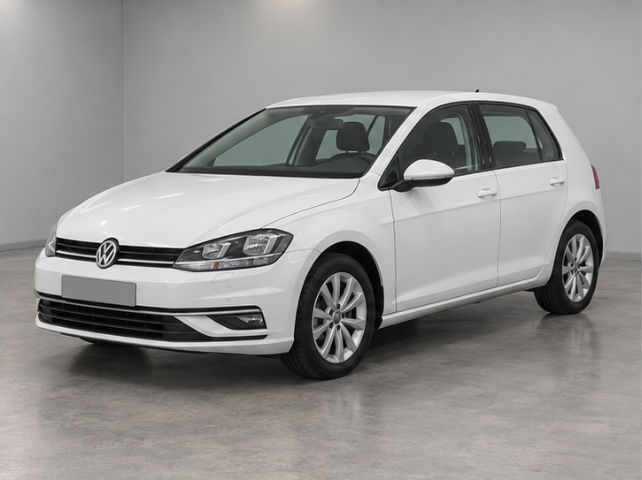
Fastback Auctions lets you collect offers from a dealer network or your own contacts while the purchase is still being considered. Compare price, validity and collection terms. A selected offer, less what your dealership needs to retain, helps set a maximum buying price; the seller's agreement and purchase still need confirmation.
2019 · 91,916 km · 2 owners · CH
Petrol · Automatic DSG · 110 kW · Hatchback · FWD
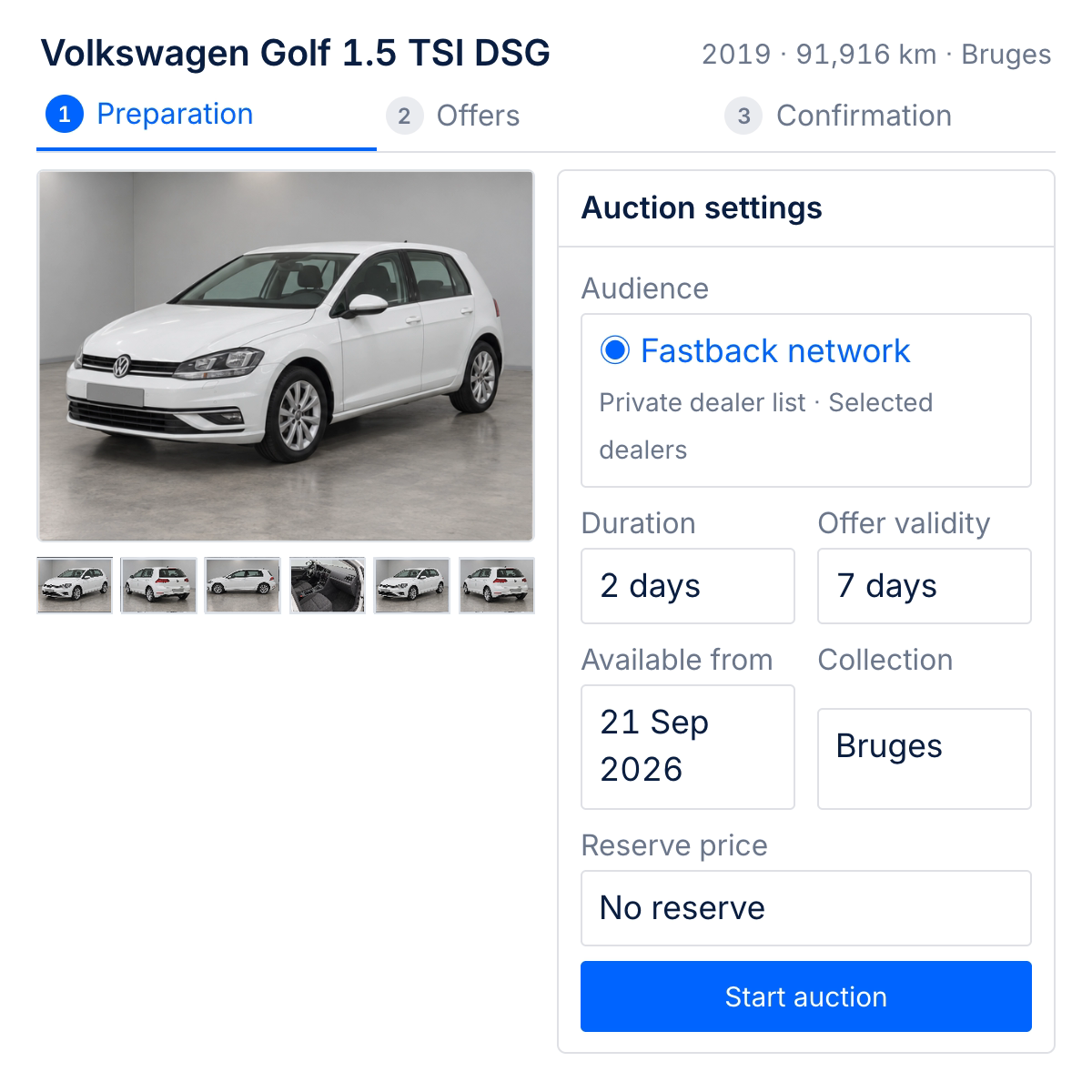
Closes 16 Sept 2026, 16:00 CEST
Optional internal threshold · no automatic winner is ever chosen
System relationship
Bring technical inspections, photos, sourcing, vehicle history, price evaluations and stock reporting into the team's workflow. Choose the services that fit your operation.
For the whole team
See the customer, conversation and opportunity together, then prepare the offer and follow-up.
Follow ownership, open tasks and the sales pipeline to see where the team needs support.
Review costs, margin and team performance across one dealership or several branches.
Keep invoices, deposits and payments connected for reconciliation and accounting.
Your setup
Show us how you advertise, handle enquiries and close deals today. We will walk through the workflow and the connections your team needs.
Book a used car demoWhere your listings and enquiries come from.
Who takes ownership and how work moves between people.
How offers, payments and results come together today.
 38%
38%



Lea Meier · 09:20
Customer hears the rattle on uneven roads. Please check the left side of the dashboard first.Lukas Keller · 10:05
Workshop slot confirmed. I’ll add the diagnosis and the next action here after the inspection.